Tuesday, October 25, 2005

Five Points of Connectivity

Here is a link to the article which defines the 5 points of connectivity as:
Communication
Collaboration
Motivation
Integration
Creativity

It concludes, "The five points of connectivity are key to the successful use of technology in the classroom, including the use of the technologies mentioned in this article: blogging, clickers, courseware, course Web sites, Croquet, del.icio.us, e-portfolios, Flickr, message boards and news groups, podcasting and vodcasting, PowerPoint, Webcasts, and wikis."

20 Technology Skills Every Educator Should Have

By Laura Turner -- From THE Journal (Technological Horizons in Education)
Below is the list... check out the full article for links to more resources for each of these topics:
1. Word Processing Skills
2. Spreadsheets Skills
3. Database Skills
4. Electronic Presentation Skills
5. Web Navigation Skills
6. Web Site Design Skills
7. E-Mail Management Skills
8. Digital Cameras
9. Computer Network Knowledge Applicable to your School System
10. File Management & Windows Explorer Skills
11. Downloading Software From the Web (Knowledge including eBooks)
12. Installing Computer Software onto a Computer System
13. WebCT or Blackboard Teaching Skills
14. Videoconferencing skills
15. Computer-Related Storage Devices (Knowledge: disks, CDs, USB drives, zip disks, DVDs, etc.)
16. Scanner Knowledge
17. Knowledge of PDAs
18. Deep Web Knowledge
19. Educational Copyright Knowledge
20. Computer Security Knowledge

What are your thoughts on these? (before you respond, be sure to see the article and the context of each!)

Creating Understanding: Cognition and Concept Maps

WHAT ARE CONCEPT MAPS?
Concept Maps (cmaps) are organized graphical representations of concepts, symbols and connections put together in such a way as to demonstrate relationships and acquired knowledge. They are different from webbing because they contain "cross-links" that connect two or more seemingly unconnected concepts or ideas together with linking words. Imagine a tree with branches and following along the trunk, out a branch and to the leaf, this is a webbing model. Now imagine that same path but the leaf is touching another leaf - could be one close by or on the other side of the tree. Makes for a strange-looking tree, but as a concept map, demonstrates deeper understanding, cognitive function and even a little creativity.


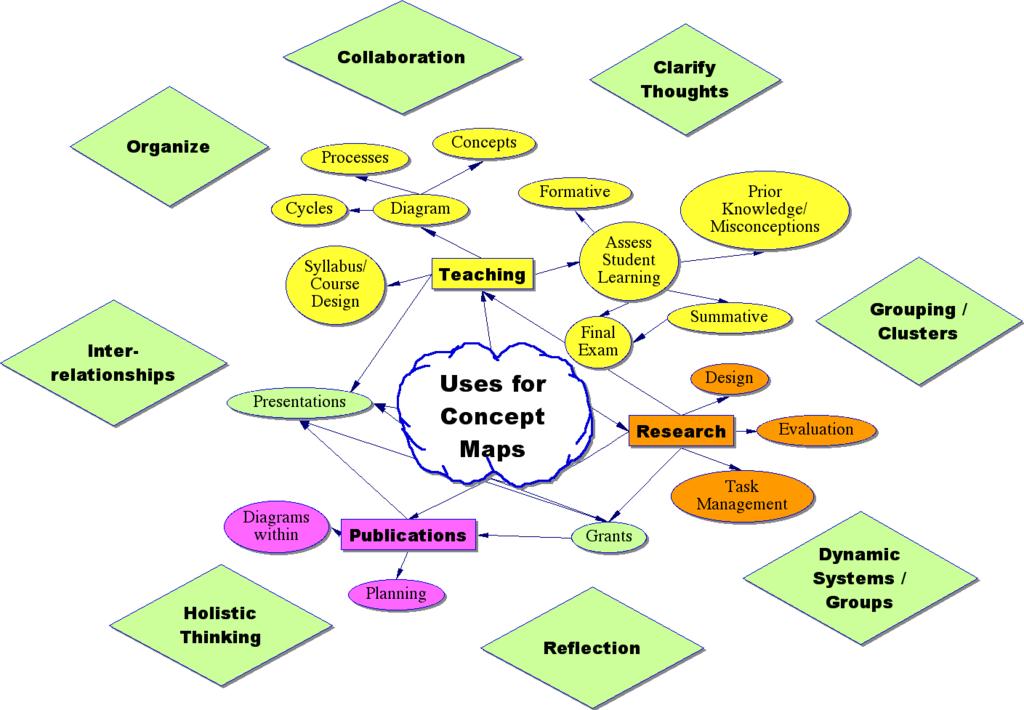
USES FOR CONCEPT MAPS:
Analogy: Conceptual maps are to pedagogy is as duct tape is to a handy person. In other words, they have many definitions and even more potential uses. Here are just a few uses:
o an instructional tool (visualizations, identifying misconceptions, formative & summative assessments, student groupings / cooperative learning) / project management),
o organizational tool for students (project, paper, reading reflection, study guide, metacognitionŠ),
o organizational tool for faculty (article, grant or research proposal), course/syllabus planner,
o any other way that meets your course outcomes!

If you have used concept maps in your course, let us know! Email Carrie with a brief description so we can supplement our general uses above with specific uses at BGSU.

To Learn More, See These Concept Map Links:

Go to CMAP HOME for a comprehensive set of resources and materials.

An exerpt from a manuscript describing Concept Mapping by the original developer and creator, J.D. Novak.

My favorite cmap on the web: Saint Nicolas!

This site has a nice graphic and gives some basic, clear instructions about creating a concept map.

This is an excellent, clear guide to cmap creation.

This instructional and handy site is about using cmaps in assessment that is heavily referenced by other sites.

This pdf is a study done about student cmapping assessment. Reading it provides you with some of the theory behind cmapping, and tables comparing assessment purposes and assessment frameworks.

Thursday, October 13, 2005

Learn About Podcasting And How It Can Enhance Your Curriculum

The word "Podcasting" comes from the combination of the words "broadcasting" and "iPOD." Podcasting in its strictest sense is distinct from other types of online media delivery because of its subscription model, which uses a feed (such as RSS or Atom) to deliver an enclosed file. Podcasting enables independent producers to create self-published, syndicated "radio shows," and gives broadcast radio programs a new distribution method. Listeners may subscribe to feeds using "podcatching" software which periodically checks for and downloads new content automatically. The word "Podcast" is also (perhaps incorrectly) used to describe the posting of any link to a media-player-compatible audio file (typically MP3) on a website.

Most podcatching software enables the user to copy podcasts to portable music players. Any digital audio player or computer with audio-playing software can play podcasts. Feeds have been used to deliver video files as well as audio. You might be surprised at how much information is available through this medium!

You, too, can incorporate podcasting into your curriculum. Interesting in learning more? Start with the following:

Duke Podcasting Symposium
The Quicktime video files available here can teach you about podcasting and various ways it can be employed, especially the video entitled, "Podcasting in the Classroom." Duke's Digital Initiative is a great all-around technology resource, too.

Fordham University Regional Educational Technology Center
An excellent site run by another podcasting-savvy university. Look here for information tailored to teachers, tips, and audio podcasts detailing various aspects of podcast creation and application.

Creating Enhanced Podcasts
Supplement your knowledge and enhance your podcasts by following the step-by-step instructions found on this site.

A Comprehensive Podcasting and Weblog Site
This website contains product info, ideas, lots of links, and more. Check it out!

Stay tuned to this CTLT blog for future posts and upcoming workshops on podcasting.

Monday, October 10, 2005

Three-Part Journal Entries

This helpful example of a Three-Part Journal Entry is an excerpt from Sacred Places, a site devoted to inquiries into life and learning. While the subject of this particular Three-Part Journal is a place, any subject that pertains to your coursework could be substituted. This style of writing is particularly useful for turning service learning experiences into substantive learning. Note the significant font changes within the entry: the descriptive section which focuses on objective accuracy is represented by normal font, the interpretive/self- critical part that promotes self awareness is in bold font, and the personal expression section that encourages intellectual analysis (which may link up to concepts and themes discussed in class and/or class readings) is signified by italics.

“The three sections of the journal are description, interpretation and personal expression. In the section labeled “description” you will write what you see, hear, feel, smell and otherwise physically sense about a place. You will find yourself working very hard to find better and more precise and concise words to describe what you come to know through your senses. For example, there are a lot of "big trees." Exactly how big is this tree? What kind of tree is it? What does it look like? What other plants are part of its environment?

The second section of the journal is your interpretation of what you have observed. What judgments are you making of this place? What qualities are you attributing to it? What does this place mean to you? What associations are you making with it? What does it make you think about?

Then finally in the personal expression section you write something — maybe a poem, a letter home, a short story — that comes out of the writing experience you have just gone through in the first two sections. Consider the ideas you have had, select the one(s) most interesting to you and write about it in a meaningful way for yourself. It should be a piece of writing you want someone else to read or that you want to send to someone. You should expect to spend 3 hours a week observing and writing in your journal.


It is recommended that all journal entries be double-spaced and dated. There is no required length, but anything less than one page each for parts one and two, and two pages for part three may be thin or underdeveloped.

Thursday, October 06, 2005

Research On Classroom Blogging & More Potential Classroom Uses

From Carrie Rathsack (Assistant Director, CTLT):

Since blogging itself is fairly new, classroom blogging/blogs research is scarce. Much of it is "in process" or just beginning. An interesting perspective that I see developing with blogs/wikis (& other emerging technologies) is a turn around from the all-to-infrequent use of student autonomy, opinion, control and communication/collaboration within the lesson itself rather than only betwen peers in the halls, lunch room or after school hours. I think teachers will be amazed at the "new knowledge" generated in these forums and then continue to build upon them. We'll see...
_______________________________________________________

1) A Bibliography of Blog Research -- a fairly extensive list with some active links. This blog (a fairly well known one on ed-tech) has some insights into current research.

2) Some Edublogging Research --- Finally!

3) Moving to the Public: Weblogs in the Writing Classroom Charles Lowe, Purdue University, and Terra Williams, Arizona State University found right here

There are many things regarding POSSIBLE benefits/uses:

4) Pedagogical implications of classroom blogging. (Trammell, Kaye D.)
(A pay-for article, but free with trial membership ;-) )

5) Librarian's Perspective on Blog Uses (by Laurel A. Clyde)
lots of other references) read it here

6) Classroom Use of Weblogs Raises Concerns

7) Visual Blogs Using Flickr in Math Classes learn about Flickr here

8) Blogging Basics : Creating Student Journals on the Web (from another well known edtech blog)

9) NECC: Lessons learned from classroom blogging.
Check out this site

10) Reflecting on the Blog (some insights)

Friday, September 30, 2005

Professor Tom Klein on Incorporating Blogs with Coursework

From Tom Klein,
Unlike the Prof.Camicao blog assignment, I give students the option of creating up to three blogs for 3 of the 6 major assignments in my Great Ideas, AS 250H, class. The six assignments ask students to write 6 "creatiques," one for each of the 6 major ideas organizing the course (monotheism, rationalism, science, democracy, the arts & humanities, and postmodernism. The "creatiques" are combination critique, summary, synthesis and creative leap, moving more toward a sustained problematizing than a neat thesis, exploration and conclusive wrap-up. They are encouraged to use multiple genres (art, poetry, letters, essays, music, editorials, etc) and to address multiple audiences (beyond me).
I do this because I believe, with Howard Gardner, that exposition and argument are NOT the only or primary ways of organizing thought, that all 8 ways of knowing (or is it now 9??) should be available to students. All of this kind of thinking suits the blog wonderfully, inasmuch as it's naturally multi-genred and moves audience far beyond teacher and school. At first, the students seemed rather stunned by the assignment, and the blog option. Now that they've seen what these can become, I think more will honor the option for future creatiques.
Great Ideas Course (AS 250H) Blog URL's
jamiehoover
tamijo
judaislam
opendiary D590808

BGSU Faculty: Start Your Classes Blogging Today!

Professors and Graduate Assistants! Have you considered integrating a webblog into your curriculum? Consider the following free blog creation sites when deciding where to begin:

blogger.com
Recently purchased by Google, this is one of the original blog creation sites. Tried and true, it is easy to use and was utilized to make the very blog you are reading right now.

blog-city.com
Offers a robust support network with a dedicated support site and team. Along with the abundance of free features, premium upgrades are also available.

livejournal.com
If you are considering having your students write routine journal entries, this site is an excellent alternative to burdensome email submissions or the old-fashioned pen and paper. It features include an open-source code, available text messaging, and voice posts, to name a few.

myblogsite.com
This site allows you to post and archive anything from articles to pictures to music. Its ability to create very large photo albums would be very useful for any course involving lots of pictures or images.

xanga.com
Xanga is a community of online diaries and journals. You can use up to 200MB of photo storage for Classic (free) users. There is also a paid service to allow for added features and storage (up to 2GB).

Do you have questions about blogging? The BGSU CTLT is working on a blogging seminar, so stay tuned for the date. And you’re always welcome to stop by or email us.

Tuesday, September 27, 2005

A Blog on Weblogs in Higher Education

Is this a case of metablogging??? There's LOTS here, including many other referencial links and categories pertaining to:
Commonplace Book
Democracy Publication
Food Blogs
Libraries
Page Design
Pedagogy
Portfolios
Software
Weblog Audio
Weblog Genres
Wikis

Another Blogging Professor's Experience

"Professor Camicao" from ? has some additional insights regarding blogging at the university level. Here is some of what P.C. has to say:

"In my third course blog, however, I am doing something more ambitious. My students (there are about 15) are expected to journal on their own blogs about course material. Once they set up their blogs in blogger (it went more smoothly than I expected), I got their adresses and made a course blogroll. I require the students to read each other's blogs and comment. I comment each week on their blog entries as well.

I'm not entirely sure how the students feel about this. I plan on surveying them later, once they are through with the experience, but judging from the vibe in the class, and their blogs, it seems to be going well. No overt grouchiness and foot dragging. Some have begun to take "ownership" of their blogs by changing templates and uploading pertinent pictures. On my end, I find that this assignment has enabled me to communicate alot more with my students outside of class through my comments on their blogs. And I like the idea that students can read my comments on other student blogs; my dialogue with an individual student is thus multi-directional. Sometimes I cross-reference my comments by providing active links in a comment to other student blogs on the same subject.

I'm not sure that all or even most students are fully aware of the benefits of this interactivity, of the ways in which this kind of dialoguing can help them with other, non-virtual assignments. But it's still early, and I am still getting them used to the capabilities of this technology and assignment category. It will be interesting to see what happens 5 weeks down the road when I start surveying them on their feelings about blogging."


All the post can be found here as well as several other links to "course bloggers". Check it out!

Monday, September 26, 2005

New "Just In Time" Workshops! (30-45 min.)

For faculty whose busy schedules prohibit long workshops, the following "Just In Time" workshops have been scheduled at The Center for Teaching, Learning and Technology. Please contact Kris Sautter at or call 2-6898 to register for the workshops you are interested in.

Creating a Video Piece Using iMOVIE (Mac based software)
Wednesday, September 28 3:00-3:45

From 1-minute thought-provoking pieces to longer productions, iMovie can help turn any faculty member or teaching GA into a blossoming film producer, director and editor. This short workshop will introduce you to this digital video editing tool and it's basic functions needed to create an effective piece that can be used right away in your course.


FILM & SLIDE SCANNING
Thursday, September 29 10:30-11:15

Images in the classroom can be a powerful addition to aid learning. Tools are currently available to convert film or multiple slides into digital images through scanning. This allows for easy backup, presentation, and archive/storage. Once converted to digital images, they can be burned onto a CD or DVD, posted on the internet, or inserted into PowerPoint/Keynote presentations or iPhoto/Picassa slide shows.

Digital Photography
The cost, quality, and ease of digital photography now make it a valid alternative to traditional film cameras. Images can then be quickly added to classroom websites, blogs, handouts, presentations to enhance the communication medium.

BASIC
Friday, September 30 9:30-10:00
Wednesday, October 5 3:00-3:30

This short but focused workshop will help you become familiar with all the standard features of a typical consumer digital camera that you may currently own or are about to purchase. Topics will include: suggested auto settings, uploading images, and camera selection suggestions.

ADVANCED
Monday, October 3 9:30-10:00
Wednesday, October 12 3:00-3:30

In this workshop, participants will delve into important manual settings for specific effects, white balancing, image management and more.

DIGITAL PHOTO MANIPULATION
Friday, September 30 2:00-2:45

Using Photoshop to enhance the image, participants will manipulate images using: image file types, color correction, levels, cropping and rotating techniques.