There are still seats available for the following workshops to be held at The Center for Teaching, Learning and Technology for the weeks of 11/28/05 and 12/5/05.
To register, please contact Kris Sautter at ksautte@bgnet.bgsu.edu or 419-372-0325.
Thank you,
Kris
BASIC Photography
November 30 3:00-3:45
This short but focused workshop will help you become familiar with all the standard features of a typical consumer digital camera that you may currently own or are about to purchase. Topics will include: suggested auto settings, uploading images, and camera selection suggestions.
Making Connections With Concept Maps
Thursday, December 1 12:00-1:30
Concept maps allow students to show deeper understanding of a topic by generating categories, making cross links and organizing it all into a hierarchical structure. Participants will engage in a discussion of the current research regarding concept mapping and learning as well as learn how to use concept mapping software such as Cmap or Inspiration to create maps for your course. The culminating activity will be to develop an activity where students are challenged to create a map in order to demonstrate their understanding of a concept, process or event.
Using Epsilen ePortfolio in Your Courses: The Basics
Monday, December 5 2:00-3:30
Dr. Milt Hakel will present how to integrate BGSU's ePortfolio application, Epsilen, in order to develop increased student interaction, reflection and evaluation within your courses.
Advanced ePortfolio Topics: Using Epsilen in Your Program
Tuesday, December 6 2:00-3:30
Dr. Milt Hakel will present how to use BGSU's ePortfolio application, Epsilen, in relation to your program learning outcomes and assessments.
Monday, November 28, 2005


Wednesday, November 16, 2005
New Workshops Are Coming Soon to the CTLT!
The Center for Teaching, Learning and Technology is offering a few new workshops in 201 University Hall. Come join us and learn more about podcasting, using Excel for interactive images and an intro to Blogs & Wikis. Please contact Kris Sautter at ksautte@bgnet.bgsu.edu or call 372-6898 to register for the workshops.
Using Classroom Assessment Techniques (CATs) to Guide Instruction
Wednesday, November 16 1:00-2:30
Many times the only assessing we do of students is in order to assign a grade, but there are other reasons and ways to assess student learning. Classroom assessment techniques offer an instructor some practical, quick and concise ways to gather information about student learning and understanding and help to guide future instruction to foster greater engagement and understanding.
In Angelo & Cross' 1993 book, Classroom Assessment Techniques, they describe 50 different techniques for teacher-centered approaches "designed to help teachers find out what students are learning in the classroom and how well they are learning it." Participants will identify critical course teaching goals that can help them determine appropriate CATs to use with their students and how to integrate these with current instructional practice to guide instruction toward increased student learning.
Creating Interactive Images (using Microsoft Excel)
Monday, November 21 2:00-3:30
Make your diagrams, maps, images and timelines come alive by using MS Excel, transforming them into interactive collaborative pieces. Students and teachers can use Excel to create images that assist in identifying parts, dates, or events while also allowing students to practice online research and citations. Participants will create an interactive file that can be used in their course and also plan a student project that incorporates their creation of one as well. These files can be saved from year to year and made available to future students as study guides, review or samples. We will also discuss how to convert these files into other types of image files so they are also available to anyone without MS Excel.
Creating Podcasts For Your Course - How to Get Started
Wednesday, November 16 3:00-5:00
If you already know the basics of podcasting and you're ready to get started, then this workshop is for you. From utilizing already created or saved podcasts to creating your own from scratch, we will go through all the steps needed in order to meet your educational outcomes. A reference handout will also be provided to all participants.
Student Voices & Collaborations: Intro to Classroom Blogs & Wikis
Thursday, November 17 2:00-3:00
Tuesday, November 22 10:00-11:30
If you're looking for a new way to get your students thinking, talking, writing, creating and analyzing knowledge, then take a look at weblogs (blogs) and wikis. Both blogs and wikis are free online writing tools, essentially webpages where students can write about a prescribed topic or generate one of their own. Blogs are often described as a personal online diary or journal of experiences, thoughts, images, ideas and conceptualizations to which others can leave comments or add their own "posts". Wikis are similar to blogs, but more collaborative since they allow for more than one person to contribute by making changes or building new pages. Both tools are fairly new, especially to the education world, but they offer a new dimension to the learning environment and community by extending the classroom experience, social engagements, and critical voice.
This workshop will provide an opportunity to discuss current research of potential uses of blogs and wikis in your classes as well as create one of your own through readily available online sources. As part of this workshop, participants will generate more discussion by contributing classroom applications of these tools to the CTLT's weblog, "Enhancing Teaching & Learning at BGSU".
Using Classroom Assessment Techniques (CATs) to Guide Instruction
Wednesday, November 16 1:00-2:30
Many times the only assessing we do of students is in order to assign a grade, but there are other reasons and ways to assess student learning. Classroom assessment techniques offer an instructor some practical, quick and concise ways to gather information about student learning and understanding and help to guide future instruction to foster greater engagement and understanding.
In Angelo & Cross' 1993 book, Classroom Assessment Techniques, they describe 50 different techniques for teacher-centered approaches "designed to help teachers find out what students are learning in the classroom and how well they are learning it." Participants will identify critical course teaching goals that can help them determine appropriate CATs to use with their students and how to integrate these with current instructional practice to guide instruction toward increased student learning.
Creating Interactive Images (using Microsoft Excel)
Monday, November 21 2:00-3:30
Make your diagrams, maps, images and timelines come alive by using MS Excel, transforming them into interactive collaborative pieces. Students and teachers can use Excel to create images that assist in identifying parts, dates, or events while also allowing students to practice online research and citations. Participants will create an interactive file that can be used in their course and also plan a student project that incorporates their creation of one as well. These files can be saved from year to year and made available to future students as study guides, review or samples. We will also discuss how to convert these files into other types of image files so they are also available to anyone without MS Excel.
Creating Podcasts For Your Course - How to Get Started
Wednesday, November 16 3:00-5:00
If you already know the basics of podcasting and you're ready to get started, then this workshop is for you. From utilizing already created or saved podcasts to creating your own from scratch, we will go through all the steps needed in order to meet your educational outcomes. A reference handout will also be provided to all participants.
Student Voices & Collaborations: Intro to Classroom Blogs & Wikis
Thursday, November 17 2:00-3:00
Tuesday, November 22 10:00-11:30
If you're looking for a new way to get your students thinking, talking, writing, creating and analyzing knowledge, then take a look at weblogs (blogs) and wikis. Both blogs and wikis are free online writing tools, essentially webpages where students can write about a prescribed topic or generate one of their own. Blogs are often described as a personal online diary or journal of experiences, thoughts, images, ideas and conceptualizations to which others can leave comments or add their own "posts". Wikis are similar to blogs, but more collaborative since they allow for more than one person to contribute by making changes or building new pages. Both tools are fairly new, especially to the education world, but they offer a new dimension to the learning environment and community by extending the classroom experience, social engagements, and critical voice.
This workshop will provide an opportunity to discuss current research of potential uses of blogs and wikis in your classes as well as create one of your own through readily available online sources. As part of this workshop, participants will generate more discussion by contributing classroom applications of these tools to the CTLT's weblog, "Enhancing Teaching & Learning at BGSU".
Monday, November 14, 2005
An Example Blog about Educational Blogging
Go to the site hyperlinked in the title above to find an example blog about, what else, educational blogging! There you'll find tips about how you can incorporate such a useful tool into your curriculum, as well as see how fun and easy it is to do. Is your curiosity piqued yet? If so, you can simply follow this link to find out more!
Rubrics to Evaluate Classroom Blogging
Here are some useful rubrics for evaluating student blog components of your curriculum:
A quick, one-page PDF version that has ratings of excellent, satisfactory or unsatisfactory.
This is called a Blog Reflection Rubric that addresses several outcomes with each weighted differently.
Here is an example of a holistic rubric, showing all requirements for a given score.
A blog rubric that distinguishes between proficient and developing skills at the university level.
One more example of an analytical rubric for evaluating a blog.
Ever assign a book to read? How about assessing student learning via a "Book Blog"? Here is a rubric to help you evaluate their book blogs.
A colorful holistic rubric (with a typo or two). It's a good example of how to create an easy to read holistic rubric for blogs or other general rubrics.
A simple rubric for scoring student blog posts. Using posts about an assignment on homelessness as an example, this rubric uses 5 categories and a 3 point scale (2=Excellent, 1= Satisfactory, and 0=Unsatisfactory). Scores are multiplied by either two or three to weight them differently for the final tabulation.
This one has some 5 categories scored on a 1-5 scale. Simple, logical and fast.
This one is a 4 point scale for many categories all dealing with blog entries made in response to reading and evaluating a literature article. Some of these might be modified or deleted to make this applicable to other disciplines as well.
This blog rubric addresses the Seven “C’s” of evaluation, on a 10-0 scale to make tabulation and assigning grade %’s easy.
This blog rubric is suited for giving a ‘blog grade’ at the end of a course for a student’s total blog contributions over the course of the term. Especially useful for blogs where students are presented problems and expected to work in groups to solve them by communicating online.
This useful rubric's scale is weighted so that the student’s score tallied out of 100%. This is excellent for blogs where a student has to create their own writing samples in response to questions or prompts.
A handy yet smaller rubric with only 3 categories and a scale of 1-4. Appropriate for journal entries or regular comments about an assigned topic.
A comprehensive blogging rubric with a 4 point scale and 5 categories. Note: Two columns (Beginning Blogger and Developing Blogger) should be switched so that Beginning Blogger and its associated items are worth only one point while Developing Blogger is worth two.
Finally, here is a rubric that can be used for student evaluations for students to post after an assignment or after the end of a course.
A quick, one-page PDF version that has ratings of excellent, satisfactory or unsatisfactory.
This is called a Blog Reflection Rubric that addresses several outcomes with each weighted differently.
Here is an example of a holistic rubric, showing all requirements for a given score.
A blog rubric that distinguishes between proficient and developing skills at the university level.
One more example of an analytical rubric for evaluating a blog.
Ever assign a book to read? How about assessing student learning via a "Book Blog"? Here is a rubric to help you evaluate their book blogs.
A colorful holistic rubric (with a typo or two). It's a good example of how to create an easy to read holistic rubric for blogs or other general rubrics.
A simple rubric for scoring student blog posts. Using posts about an assignment on homelessness as an example, this rubric uses 5 categories and a 3 point scale (2=Excellent, 1= Satisfactory, and 0=Unsatisfactory). Scores are multiplied by either two or three to weight them differently for the final tabulation.
This one has some 5 categories scored on a 1-5 scale. Simple, logical and fast.
This one is a 4 point scale for many categories all dealing with blog entries made in response to reading and evaluating a literature article. Some of these might be modified or deleted to make this applicable to other disciplines as well.
This blog rubric addresses the Seven “C’s” of evaluation, on a 10-0 scale to make tabulation and assigning grade %’s easy.
This blog rubric is suited for giving a ‘blog grade’ at the end of a course for a student’s total blog contributions over the course of the term. Especially useful for blogs where students are presented problems and expected to work in groups to solve them by communicating online.
This useful rubric's scale is weighted so that the student’s score tallied out of 100%. This is excellent for blogs where a student has to create their own writing samples in response to questions or prompts.
A handy yet smaller rubric with only 3 categories and a scale of 1-4. Appropriate for journal entries or regular comments about an assigned topic.
A comprehensive blogging rubric with a 4 point scale and 5 categories. Note: Two columns (Beginning Blogger and Developing Blogger) should be switched so that Beginning Blogger and its associated items are worth only one point while Developing Blogger is worth two.
Finally, here is a rubric that can be used for student evaluations for students to post after an assignment or after the end of a course.
Thursday, November 03, 2005
Assessing Student Learning Using Rubrics
Here are some resources on rubrics that were shared during our Threaded Workshop Series on assessment:
Designing Scoring Rubrics for Your Classroom (Craig Mertler, BGSU)
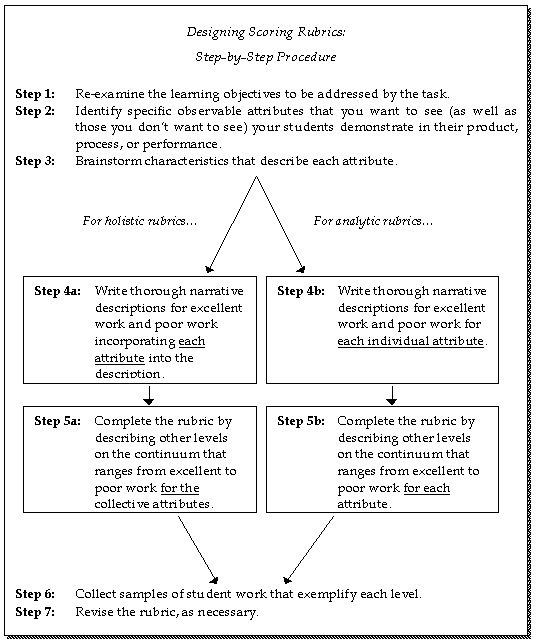
Rubrics are rating scales-as opposed to checklists-that are used with performance assessments. They are formally defined as scoring guides, consisting of specific pre-established performance criteria, used in evaluating student work on performance assessments. Rubrics are typically the specific form of scoring instrument used when evaluating student performances or products resulting from a performance task.
There are two types of rubrics: holistic and analytic. A holistic rubric requires the teacher to score the overall process or product as a whole, without judging the component parts separately (Nitko, 2001). In contrast, with an analytic rubric, the teacher scores separate, individual parts of the product or performance first, then sums the individual scores to obtain a total score (Moskal, 2000; Nitko, 2001).
Authentic Assessment Toolbox (Jon Mueller)
Weighting certain skills or categories within the rubric should also be considered.
Create & Save Your Own Rubrics
RubiStar is a FREE online tool to help the teacher who wants to use rubrics but does not have the time to develop them from scratch. There are about 50 categorized templates to start with when creating a rubric for your own assignment. You select appropriate criteria from pull down menus and descriptions are instantly added into the four rated columns. Each criteria, rating/score and description is editable either online in Rubistar or after downloading it into an Excel file.
These rubrics can be printed, saved as web browser files or downloaded as Excel spreadsheets to be manipulated further, as needed. For example, if you'd like to add a column for "Student Self Evaluation", you could do that in the Excel version by simply adding a new column and typing in a new heading as needed.
Designing Scoring Rubrics for Your Classroom (Craig Mertler, BGSU)
Rubrics are rating scales-as opposed to checklists-that are used with performance assessments. They are formally defined as scoring guides, consisting of specific pre-established performance criteria, used in evaluating student work on performance assessments. Rubrics are typically the specific form of scoring instrument used when evaluating student performances or products resulting from a performance task.
There are two types of rubrics: holistic and analytic. A holistic rubric requires the teacher to score the overall process or product as a whole, without judging the component parts separately (Nitko, 2001). In contrast, with an analytic rubric, the teacher scores separate, individual parts of the product or performance first, then sums the individual scores to obtain a total score (Moskal, 2000; Nitko, 2001).
Authentic Assessment Toolbox (Jon Mueller)
Weighting certain skills or categories within the rubric should also be considered.
Create & Save Your Own Rubrics
RubiStar is a FREE online tool to help the teacher who wants to use rubrics but does not have the time to develop them from scratch. There are about 50 categorized templates to start with when creating a rubric for your own assignment. You select appropriate criteria from pull down menus and descriptions are instantly added into the four rated columns. Each criteria, rating/score and description is editable either online in Rubistar or after downloading it into an Excel file.
These rubrics can be printed, saved as web browser files or downloaded as Excel spreadsheets to be manipulated further, as needed. For example, if you'd like to add a column for "Student Self Evaluation", you could do that in the Excel version by simply adding a new column and typing in a new heading as needed.
Tuesday, October 25, 2005
Five Points of Connectivity
Here is a link to the article which defines the 5 points of connectivity as:
Communication
Collaboration
Motivation
Integration
Creativity
It concludes, "The five points of connectivity are key to the successful use of technology in the classroom, including the use of the technologies mentioned in this article: blogging, clickers, courseware, course Web sites, Croquet, del.icio.us, e-portfolios, Flickr, message boards and news groups, podcasting and vodcasting, PowerPoint, Webcasts, and wikis."
Collaboration
Motivation
Integration
Creativity
It concludes, "The five points of connectivity are key to the successful use of technology in the classroom, including the use of the technologies mentioned in this article: blogging, clickers, courseware, course Web sites, Croquet, del.icio.us, e-portfolios, Flickr, message boards and news groups, podcasting and vodcasting, PowerPoint, Webcasts, and wikis."
20 Technology Skills Every Educator Should Have
By Laura Turner -- From THE Journal (Technological Horizons in Education)
Below is the list... check out the full article for links to more resources for each of these topics:
1. Word Processing Skills
2. Spreadsheets Skills
3. Database Skills
4. Electronic Presentation Skills
5. Web Navigation Skills
6. Web Site Design Skills
7. E-Mail Management Skills
8. Digital Cameras
9. Computer Network Knowledge Applicable to your School System
10. File Management & Windows Explorer Skills
11. Downloading Software From the Web (Knowledge including eBooks)
12. Installing Computer Software onto a Computer System
13. WebCT or Blackboard Teaching Skills
14. Videoconferencing skills
15. Computer-Related Storage Devices (Knowledge: disks, CDs, USB drives, zip disks, DVDs, etc.)
16. Scanner Knowledge
17. Knowledge of PDAs
18. Deep Web Knowledge
19. Educational Copyright Knowledge
20. Computer Security Knowledge
What are your thoughts on these? (before you respond, be sure to see the article and the context of each!)
Below is the list... check out the full article for links to more resources for each of these topics:
1. Word Processing Skills
2. Spreadsheets Skills
3. Database Skills
4. Electronic Presentation Skills
5. Web Navigation Skills
6. Web Site Design Skills
7. E-Mail Management Skills
8. Digital Cameras
9. Computer Network Knowledge Applicable to your School System
10. File Management & Windows Explorer Skills
11. Downloading Software From the Web (Knowledge including eBooks)
12. Installing Computer Software onto a Computer System
13. WebCT or Blackboard Teaching Skills
14. Videoconferencing skills
15. Computer-Related Storage Devices (Knowledge: disks, CDs, USB drives, zip disks, DVDs, etc.)
16. Scanner Knowledge
17. Knowledge of PDAs
18. Deep Web Knowledge
19. Educational Copyright Knowledge
20. Computer Security Knowledge
What are your thoughts on these? (before you respond, be sure to see the article and the context of each!)
Creating Understanding: Cognition and Concept Maps
WHAT ARE CONCEPT MAPS?
Concept Maps (cmaps) are organized graphical representations of concepts, symbols and connections put together in such a way as to demonstrate relationships and acquired knowledge. They are different from webbing because they contain "cross-links" that connect two or more seemingly unconnected concepts or ideas together with linking words. Imagine a tree with branches and following along the trunk, out a branch and to the leaf, this is a webbing model. Now imagine that same path but the leaf is touching another leaf - could be one close by or on the other side of the tree. Makes for a strange-looking tree, but as a concept map, demonstrates deeper understanding, cognitive function and even a little creativity.
USES FOR CONCEPT MAPS:
Analogy: Conceptual maps are to pedagogy is as duct tape is to a handy person. In other words, they have many definitions and even more potential uses. Here are just a few uses:
o an instructional tool (visualizations, identifying misconceptions, formative & summative assessments, student groupings / cooperative learning) / project management),
o organizational tool for students (project, paper, reading reflection, study guide, metacognitionŠ),
o organizational tool for faculty (article, grant or research proposal), course/syllabus planner,
o any other way that meets your course outcomes!
If you have used concept maps in your course, let us know! Email Carrie with a brief description so we can supplement our general uses above with specific uses at BGSU.
To Learn More, See These Concept Map Links:
Go to CMAP HOME for a comprehensive set of resources and materials.
An exerpt from a manuscript describing Concept Mapping by the original developer and creator, J.D. Novak.
My favorite cmap on the web: Saint Nicolas!
This site has a nice graphic and gives some basic, clear instructions about creating a concept map.
This is an excellent, clear guide to cmap creation.
This instructional and handy site is about using cmaps in assessment that is heavily referenced by other sites.
This pdf is a study done about student cmapping assessment. Reading it provides you with some of the theory behind cmapping, and tables comparing assessment purposes and assessment frameworks.
Concept Maps (cmaps) are organized graphical representations of concepts, symbols and connections put together in such a way as to demonstrate relationships and acquired knowledge. They are different from webbing because they contain "cross-links" that connect two or more seemingly unconnected concepts or ideas together with linking words. Imagine a tree with branches and following along the trunk, out a branch and to the leaf, this is a webbing model. Now imagine that same path but the leaf is touching another leaf - could be one close by or on the other side of the tree. Makes for a strange-looking tree, but as a concept map, demonstrates deeper understanding, cognitive function and even a little creativity.
USES FOR CONCEPT MAPS:
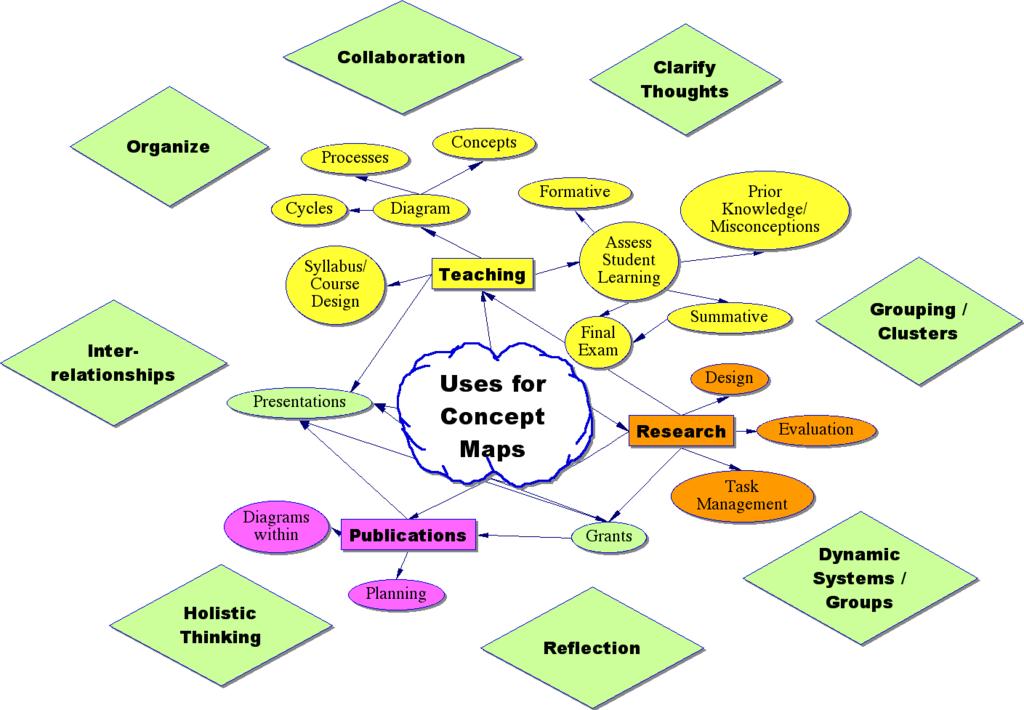
Analogy: Conceptual maps are to pedagogy is as duct tape is to a handy person. In other words, they have many definitions and even more potential uses. Here are just a few uses:
o an instructional tool (visualizations, identifying misconceptions, formative & summative assessments, student groupings / cooperative learning) / project management),
o organizational tool for students (project, paper, reading reflection, study guide, metacognitionŠ),
o organizational tool for faculty (article, grant or research proposal), course/syllabus planner,
o any other way that meets your course outcomes!
If you have used concept maps in your course, let us know! Email Carrie with a brief description so we can supplement our general uses above with specific uses at BGSU.
To Learn More, See These Concept Map Links:
Go to CMAP HOME for a comprehensive set of resources and materials.
An exerpt from a manuscript describing Concept Mapping by the original developer and creator, J.D. Novak.
My favorite cmap on the web: Saint Nicolas!
This site has a nice graphic and gives some basic, clear instructions about creating a concept map.
This is an excellent, clear guide to cmap creation.
This instructional and handy site is about using cmaps in assessment that is heavily referenced by other sites.
This pdf is a study done about student cmapping assessment. Reading it provides you with some of the theory behind cmapping, and tables comparing assessment purposes and assessment frameworks.
Thursday, October 13, 2005
Learn About Podcasting And How It Can Enhance Your Curriculum
The word "Podcasting" comes from the combination of the words "broadcasting" and "iPOD." Podcasting in its strictest sense is distinct from other types of online media delivery because of its subscription model, which uses a feed (such as RSS or Atom) to deliver an enclosed file. Podcasting enables independent producers to create self-published, syndicated "radio shows," and gives broadcast radio programs a new distribution method. Listeners may subscribe to feeds using "podcatching" software which periodically checks for and downloads new content automatically. The word "Podcast" is also (perhaps incorrectly) used to describe the posting of any link to a media-player-compatible audio file (typically MP3) on a website.
Most podcatching software enables the user to copy podcasts to portable music players. Any digital audio player or computer with audio-playing software can play podcasts. Feeds have been used to deliver video files as well as audio. You might be surprised at how much information is available through this medium!
You, too, can incorporate podcasting into your curriculum. Interesting in learning more? Start with the following:
Duke Podcasting Symposium
The Quicktime video files available here can teach you about podcasting and various ways it can be employed, especially the video entitled, "Podcasting in the Classroom." Duke's Digital Initiative is a great all-around technology resource, too.
Fordham University Regional Educational Technology Center
An excellent site run by another podcasting-savvy university. Look here for information tailored to teachers, tips, and audio podcasts detailing various aspects of podcast creation and application.
Creating Enhanced Podcasts
Supplement your knowledge and enhance your podcasts by following the step-by-step instructions found on this site.
A Comprehensive Podcasting and Weblog Site
This website contains product info, ideas, lots of links, and more. Check it out!
Stay tuned to this CTLT blog for future posts and upcoming workshops on podcasting.
Most podcatching software enables the user to copy podcasts to portable music players. Any digital audio player or computer with audio-playing software can play podcasts. Feeds have been used to deliver video files as well as audio. You might be surprised at how much information is available through this medium!
You, too, can incorporate podcasting into your curriculum. Interesting in learning more? Start with the following:
Duke Podcasting Symposium
The Quicktime video files available here can teach you about podcasting and various ways it can be employed, especially the video entitled, "Podcasting in the Classroom." Duke's Digital Initiative is a great all-around technology resource, too.
Fordham University Regional Educational Technology Center
An excellent site run by another podcasting-savvy university. Look here for information tailored to teachers, tips, and audio podcasts detailing various aspects of podcast creation and application.
Creating Enhanced Podcasts
Supplement your knowledge and enhance your podcasts by following the step-by-step instructions found on this site.
A Comprehensive Podcasting and Weblog Site
This website contains product info, ideas, lots of links, and more. Check it out!
Stay tuned to this CTLT blog for future posts and upcoming workshops on podcasting.
Monday, October 10, 2005
Three-Part Journal Entries
This helpful example of a Three-Part Journal Entry is an excerpt from Sacred Places, a site devoted to inquiries into life and learning. While the subject of this particular Three-Part Journal is a place, any subject that pertains to your coursework could be substituted. This style of writing is particularly useful for turning service learning experiences into substantive learning. Note the significant font changes within the entry: the descriptive section which focuses on objective accuracy is represented by normal font, the interpretive/self- critical part that promotes self awareness is in bold font, and the personal expression section that encourages intellectual analysis (which may link up to concepts and themes discussed in class and/or class readings) is signified by italics.
“The three sections of the journal are description, interpretation and personal expression. In the section labeled “description” you will write what you see, hear, feel, smell and otherwise physically sense about a place. You will find yourself working very hard to find better and more precise and concise words to describe what you come to know through your senses. For example, there are a lot of "big trees." Exactly how big is this tree? What kind of tree is it? What does it look like? What other plants are part of its environment?
The second section of the journal is your interpretation of what you have observed. What judgments are you making of this place? What qualities are you attributing to it? What does this place mean to you? What associations are you making with it? What does it make you think about?
Then finally in the personal expression section you write something — maybe a poem, a letter home, a short story — that comes out of the writing experience you have just gone through in the first two sections. Consider the ideas you have had, select the one(s) most interesting to you and write about it in a meaningful way for yourself. It should be a piece of writing you want someone else to read or that you want to send to someone. You should expect to spend 3 hours a week observing and writing in your journal.”
It is recommended that all journal entries be double-spaced and dated. There is no required length, but anything less than one page each for parts one and two, and two pages for part three may be thin or underdeveloped.
“The three sections of the journal are description, interpretation and personal expression. In the section labeled “description” you will write what you see, hear, feel, smell and otherwise physically sense about a place. You will find yourself working very hard to find better and more precise and concise words to describe what you come to know through your senses. For example, there are a lot of "big trees." Exactly how big is this tree? What kind of tree is it? What does it look like? What other plants are part of its environment?
The second section of the journal is your interpretation of what you have observed. What judgments are you making of this place? What qualities are you attributing to it? What does this place mean to you? What associations are you making with it? What does it make you think about?
Then finally in the personal expression section you write something — maybe a poem, a letter home, a short story — that comes out of the writing experience you have just gone through in the first two sections. Consider the ideas you have had, select the one(s) most interesting to you and write about it in a meaningful way for yourself. It should be a piece of writing you want someone else to read or that you want to send to someone. You should expect to spend 3 hours a week observing and writing in your journal.”
It is recommended that all journal entries be double-spaced and dated. There is no required length, but anything less than one page each for parts one and two, and two pages for part three may be thin or underdeveloped.
Thursday, October 06, 2005
Research On Classroom Blogging & More Potential Classroom Uses
From Carrie Rathsack (Assistant Director, CTLT):
Since blogging itself is fairly new, classroom blogging/blogs research is scarce. Much of it is "in process" or just beginning. An interesting perspective that I see developing with blogs/wikis (& other emerging technologies) is a turn around from the all-to-infrequent use of student autonomy, opinion, control and communication/collaboration within the lesson itself rather than only betwen peers in the halls, lunch room or after school hours. I think teachers will be amazed at the "new knowledge" generated in these forums and then continue to build upon them. We'll see...
_______________________________________________________
1) A Bibliography of Blog Research -- a fairly extensive list with some active links. This blog (a fairly well known one on ed-tech) has some insights into current research.
2) Some Edublogging Research --- Finally!
3) Moving to the Public: Weblogs in the Writing Classroom Charles Lowe, Purdue University, and Terra Williams, Arizona State University found right here
There are many things regarding POSSIBLE benefits/uses:
4) Pedagogical implications of classroom blogging. (Trammell, Kaye D.)
(A pay-for article, but free with trial membership ;-) )
5) Librarian's Perspective on Blog Uses (by Laurel A. Clyde)
lots of other references) read it here
6) Classroom Use of Weblogs Raises Concerns
7) Visual Blogs Using Flickr in Math Classes learn about Flickr here
8) Blogging Basics : Creating Student Journals on the Web (from another well known edtech blog)
9) NECC: Lessons learned from classroom blogging.
Check out this site
10) Reflecting on the Blog (some insights)
Since blogging itself is fairly new, classroom blogging/blogs research is scarce. Much of it is "in process" or just beginning. An interesting perspective that I see developing with blogs/wikis (& other emerging technologies) is a turn around from the all-to-infrequent use of student autonomy, opinion, control and communication/collaboration within the lesson itself rather than only betwen peers in the halls, lunch room or after school hours. I think teachers will be amazed at the "new knowledge" generated in these forums and then continue to build upon them. We'll see...
_______________________________________________________
1) A Bibliography of Blog Research -- a fairly extensive list with some active links. This blog (a fairly well known one on ed-tech) has some insights into current research.
2) Some Edublogging Research --- Finally!
3) Moving to the Public: Weblogs in the Writing Classroom Charles Lowe, Purdue University, and Terra Williams, Arizona State University found right here
There are many things regarding POSSIBLE benefits/uses:
4) Pedagogical implications of classroom blogging. (Trammell, Kaye D.)
(A pay-for article, but free with trial membership ;-) )
5) Librarian's Perspective on Blog Uses (by Laurel A. Clyde)
lots of other references) read it here
6) Classroom Use of Weblogs Raises Concerns
7) Visual Blogs Using Flickr in Math Classes learn about Flickr here
8) Blogging Basics : Creating Student Journals on the Web (from another well known edtech blog)
9) NECC: Lessons learned from classroom blogging.
Check out this site
10) Reflecting on the Blog (some insights)
Subscribe to:
Posts (Atom)