Monday, January 30, 2006

Making Connections


How do you incorporate student prior knowledge or expertise in your lesson/lecture? (Post your ideas in the comments below)

Friday, January 27, 2006

Helpful Tips for Faculty

Here are some strategies that may be helpful as you settle into another busy, yet productive semester. These were discussed during the New Faculty Learning Community:
    • Create a routine for the students to get used to, for example: the first 5-10 min. of class or last 5-10 (but not the entire class)
    • Give preview questions to go with each reading
    • To return papers, call their name and have them come pick it up from you up front – this way you get to see them for a longer period of time (not just the back of their head)
    • In order to proof your own writing (which is often a futile effort since you wrote it and easily overlook errors), read it from the end, one full sentence at a time.
    • To reduce the cringe factor or to relieve anticipatory stress for your students, use euphemisms ☺ (Ex.- “preparation exercises” are quizzes, “narrative piece” is a paper)
    • Create an outline or “skeleton” of your PPT (PowerPoint) and post it on BlackBoard before the class so they can fill it in during class (or for preparatory work ready when they come to class)
    • As always seems to be the case, moderation is the key when it comes to reflecting on your course evaluations
    • As a professional with multiple demands on your time – teaching, research, service, committees, professional development, and so on, it’s essential to schedule time (even if it’s 15-30 minutes a day, 2 times a week) – Ex- allow for 30 min. on M, W, F to write a professional article. For more information on this and researched benefits, check out F.O.P. (First Order Principles for College Teachers), by Robert Boice
    • Remember… writing and research are both recursive, so the more you put in, the more you will get out of each, oftentimes “magically”

Please feel free to add your own in the comments section below... the more, the better!

Thursday, January 26, 2006

Teaching To & Learning From the "Gamer Generation"


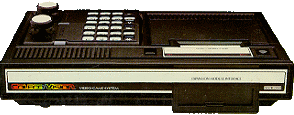
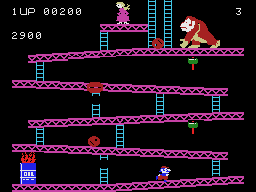
Little did I know that when my brother and I received a ColecoVision game system for Christmas when I was 12 years old, we were unknowingly initiated into the “Gamer Generation”. Growing up playing video games became an enigma that now separates us from our older siblings, parents and many other elders. But unlike most university students, I did not grow up from birth with a mouse in one hand and a cell phone in the other… this puts me in a “tweener” generation that can relate to what teaching and learning used to be like and what may be required now of educators to reach "the gamers".

Today, I rarely find (make) the time to play any video games although I do have an outdated PS1 (original PlayStation) system tucked away somewhere collecting dust. But coming from this experience, and as a former high school teacher, I found myself nodding my head in agreement at much of what Dr. John C. Beck had to say this past Tuesday at the first President’s Lecture Series event. (click here to log into to the DVSS and search for a streaming video of the event)


Here is a summary of his major points made (with some commentaries in parentheses):

John C. Beck (Capturing the Value of the Gamer Generation)


• They think, believe and learn differently
• Growing up on games creates a whole new way of thinking about the world
    - The game worlds are immersive worlds, often competitive
    - (they control things, investigate, goal seeking, emotion, decision making/problem-solving)

• Gamers are:
    - More competitive
    - Naturally global-thinking
    - More social and work better in teams
    - Willing to take risks -- attitude of “immunity to failure”
    - More confident in abilities -- prefer to be paid based on actual performance rather than a set salary
    - Believe more in luck (can be seen as them not caring and shrugging it off)
    - Flexible, don’t mind having to change (this will be helpful with the rapid changes we’re just beginning to enter)
    - They can easily go “meta”/reflective

• Boys – spatial; girls – linear (success in schools to girls, boys like games for spatial environment)
- Both want to be heroes (“that’s not fair”; kids starting charities and non-profits)
• They want to be challenged; give tough jobs/tasks
    - Natural multi-taskers
    - They want fun (to be engaged/interested/pay attention to)

• Games are basically fair (player messes up, they lose, etc.)
• “Strategy guides are good; Level Bosses are not” – that is there implied / undercurrent reality
    - Strategy guides help gamers be successful in getting through a game
    - Level bosses are something to be conquered, overcome, killed, etc. in order to move on to the next level
    - As a boss (teacher/leader), be a “strategy guide”, NOT a “level boss”

• Competitive, risky, difficult, social, global, heroic – build this type of world for them to be involved in
• All of this will change… so stay current!
- Blogs – potentially creating a world where secrets are less viable
• (Games have the potential to be a training ground for doing good; more games to promote this are forthcoming)
- Game of smiley faces clicked on while traveling over clouds – the study included approx. 130 people – it improved their self esteem
• How will relationships change in future because of this interaction between machine & human?
- Second Life – virtual world allows you to become who you want to be online
• Used to be able to buy things from others on eBay, not anymore
• “Sweat-shops” in India/China that you can contract out – i.e.-pay - to click on mouse a million times so you can gain points in these virtual worlds (Many virtual gamers are outraged by this, see “fair” item above)
• Neural pathways are created up until the age of about 13 – after that, it’s more difficult to change &/or learn (it can be done, but not as fluid or easily attained)
• Gamer generation CONTROLLED the dot.com ride – they were just living out a live video game! Like Super Mario Bros. where you collect gold pieces and once you get enough you can fly!!! – like a corporate jet!
-When the “ride” was over, they were OK… onto the next adventure…

To access an online audio recording of IT Conversations interview with John Beck, ”When Gamers Enter the Workforce” (~17 min.)

Thursday, January 19, 2006

Reflections from the Reflective Teaching Faculty Learning Community


We had an interesting and thought-provoking discussion today about student reading comprehension, literacy, images and learning styles. Here is just a sampling of the ideas shared and questions raised: (feel free to add a comment – see link below this post)


How do images play into the “literacy realm” or the “traditional literacy realm”? Are they an integrated part or treated as a separate medium?

Students are officially taught reading literacy, but we are never taught how images affect us and analyzing what is important (i.e.- media literacy – see The Center for Media Literacy

Are students more visual now than in years past? When do they adapt to ignoring images in text and why? Do we (educators) do this? Publishers?

Pictures can be considered a multilingual medium… is this the cause or effect of why we are becoming a more visual society (because our society and culture is extending beyond English & “Americanism” toward a true melting pot of cultures).

Do you have anything in your syllabus about the importance of images, graphs, charts, diagrams and their application to the textual knowledge?

Images portray emotions, often invoking a reaction or response. How does this play into the learning experience? (a picture says a 1000 words) What can be stated better with an image instead of words?

How much “peripheral learning” is being missed now since students can simply search for specific phrases or keywords in a web page or digital document rather than accidentally learning something along the way to finding the “hidden” required information within a body of text. (Similar to a long road trip to a destination vs. an airplane ride… how much peripheral learning did we acquire while in the midst of constantly repeating, “Are we there yet?!”)

What about doing something by hand versus using a computer program that does it automatically? (Ex.- only create graphs on computers or make some/one by hand too). Similar to typing 2 + 2 into a calculator and getting 5… “so that must be the right answer because that’s what the calculator says”.

In order to bring images to the forefront of students’ consciousness, consider digital or visual storytelling – similar to picture books – have students create or gather images to incorporate into a lesson or presentation. Sometimes just an image (with no text) can be more powerful than any words can convey, whether a paper copy or digital.

Have students keep a journal of their learning experiences and application attempts. Better yet, keep a journal yourself – listing your observations, insights and reflections about what’s going on in the classroom and in your student’s minds, where you want to go next or try next time teaching this lesson.

An interesting point came up about skimming to find information… How many readers of research go directly from abstract to conclusion vs. reading methodologies and results first? Why is that? (Time is an obvious factor here) Along those same lines, is the image vs. text issue with students simply a factor of time and efficiency? At what cost?

“Merely descriptive” research is often looked down upon thanks to the emergence of quantitative analysis a couple decades ago. With numbers to back up conclusions, the value of descriptive analyses has been overlooked, in both the sciences and non-sciences. Is this possibly partly due to our migration away from the narrative voice?

To sum it up, there were many reflections today that come down to the realization that there are multiple ways of knowing – for both student and teacher – and for most of what we teach, there is not only one answer or path to learning, but rather many possible routes toward that ideal common destination… wherever that may be. For your students’ sake, be sure to keep those roads open, easily located, and allow for detours as necessary!

Tuesday, January 17, 2006

Earth Images/Maps for Your Course?


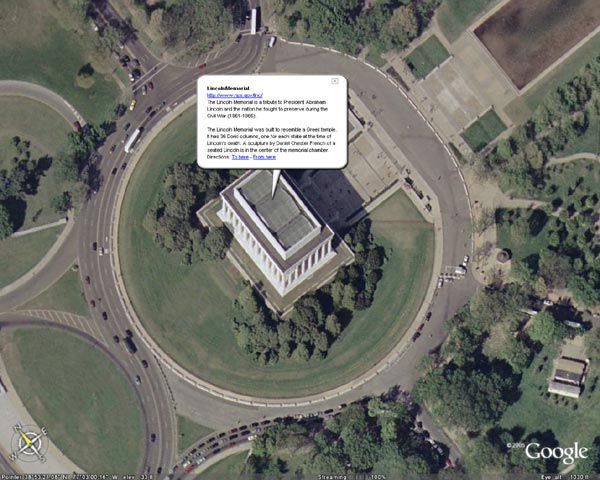
Google Earth is a free software download for PCs (WinXP) and now Macs (OS 10.4) that allow you to view actual satellite images of most locations on Earth. From Google: "You point and zoom to anyplace on the planet that you want to explore. Satellite images and local facts zoom into view. Tap into Google search to show local points of interest and facts. Zoom to a specific address to check out an apartment or hotel. View driving directions and even fly along your route."


Check it out at: http://earth.google.com/

Tuesday, December 13, 2005

CapEd - Capital U.'s Blog about Educational Blogging

Check out this "blog about blogs" by Capital University. It designed to be an online reference for blog use in education, and is a valuable resource. Add it to your list of sites you periodically review!

http://capedblog.blogspot.com/

Monday, December 12, 2005

THE QUESTION-ONLY SESSION

(written by: Stacey Mathey Osborn (Children's Literature, English)

As a wrap-up to a lecture or class discussion, try a question-only session. The original idea came from a conference of Lincoln Center Teaching Artists in New York City. These folks are the real deal in teaching; I was blown away by the intensity of the sessions and teaching tools (not to mention the self-knowledge) I carried away from each day's activities.

How to:
Everyone in the class jots down a question on a scrap piece of paper. The questions can take any form (who, what, where, etc), and should be based on the class lecture or discussion. When everyone has written a question down, call for all the questions by going around the room, but DO NOT ANSWER them. Everyone participates (even if they just say "pass). You'll be surprised at what you'll learn about not only your students but about your field of study! And your students will be really surprised at how inquisitive they actually are.

Here are some things to keep in mind.
o Give an example (or two!) of the type of question you mean. Questions should be related to the class lecture or discussion.
o Questions can be something that students are still wondering about, or can be very general questions about the topic under discussion.
o If students are struggling to come up with a question, have them write down one fact that they learned in class that day, and turn that into a question. For example, after a lecture on traditional literature, students may have learned that the "trickster character" in many African countries is named Anansi the Spider. A question that might be developed off that fact is: "How did the spider come to be used as "the trickster" in Africa, but in western culture, it's often a fox?" Or "Who was the first person to tell an Anansi story?" Or "Are there other trickster types besides Anansi in traditional African tales?"
o Students are allowed to say "pass" if they don't want to participate. This also makes it easy for students who don't "get it" the first time you do this.
o DO NOT ANSWER the questions, even if you know the answer! Just let the questions fly! Let the spirit of "lifelong learning" seize the class.
o The first time you do this, be sure to give students at least 3-4 minutes to come up with a question. You may even suggest that they come up with 3-that puts the pressure on, and they're almost sure to come up with at least one question.
o It takes about 8-10 minutes to run the whole "show," from the introduction of the idea, to the writing, to the speaking.
o Encourage students NOT TO PACK UP THEIR THINGS until everyone has spoken their question.
o If a question is really outstanding, at the end of the session, ask the student to give you a copy, or jot it down yourself and answer it at the beginning of the next class. This is a GREAT transition, and also shows the value of the question-only session as a tool for further inquiry.

VARIATIONS:
The pre-emptive strike question-only session

As the name suggests, have students ask questions about a text under discussion before you start the class lecture or discussion.

"Upcoming-assignment" question-only session:

Have a big project or paper coming up? Take the last 10-15 minutes of class and have students brainstorm with a partner, discussing approaches to the project, etc. Each person has to write down 3 questions that the other person asked them. Then, you open up the floor for questions only. That's a really fun one. You'll learn very quickly what they're apprehensive about.

"I didn't know":

This is actually an idea I got from an 8th-grade middle school English teacher. Apparently, one day her students were pestering her with so many questions (for which she had no answers) that finally she yelled out in frustration: "You know, I can't know everything!" She asked all her students to take out a piece of paper and write down 10 things that they just "don't know." She said the results were amazing! The students were all humbled by one another's admissions. I re-conceived the idea for my college-level students who really seem to know just about everything (ahem). So here's how it goes.

Students write an "I didn't know" statement about something that they learned in class that day.

Here are some things to keep in mind...
o I ALWAYS go first AND LAST with this one.I say something that I didn't know before coming to class that day, or something that I learned that was new when I was reviewing my lecture notes. THEN. I try to pay really close attention to the students, and try to learn on the spot from what they're saying, and try to conclude with a brand-new thing that I learned at just that moment. For example, it could even be "I didn't know that Anansi the Spider was so fascinating to y'all!" if many students said that they didn't know about Anansi before coming to class.
o I use the "I didn't know." session only after I've done the question-only session a few times in previous classes. They're a lot more comfortable speaking out about something they didn't know if they know the routine from the question-only session.
o The fun thing about this is I used to think that students already knew everything I was saying before I said it. WRONG! It was very gratifying to hear that even some of the simplest things were new to them.
o It's also nice for them to hear that their peers all learned something, too-that they weren't the only one in the class who "didn't know" a fact.

Thursday, December 08, 2005

Free Online Surveys

Surveys are an excellent way of collecting and analysing information quickly and efficiently. Many electronic surveys found online are even free! You'd be surprised at how useful these tools are once you start using them! After reviewing many of the available ones out there, I've separated the good from the bad for you:


PollCat Surveys Lite - http://www.pollcat.com/

-----------------------------------------------------

PollCat offers branded surveys with a variety of question format
options. A 30-Second Tutorial gets you off to a quick start with your
first PollCat survey. PollCat Lite offers a nice selection of survey
creation and editing tools, and you can choose from many types of answer choices. Deploy PollCat surveys with OneClick Publishing. Add your own Header, Footer, and Page Titles, or use standardized templates. Additional features include: unlimited survey length (questions or pages), unlimited length of data collected,
direct links from your web page to a survey with auto or defined
return, anonymous questionnaires, linkage of extra data to responses
for custom tracking and reporting, response data downloadable in MS
Access, XML, HTML, and Excel formats. PollCat Surveys are
remotely-hosted. Each PollCat poll has a unique URL that you can
e-mail to survey takers, or post as a link on your website.


Survey Monkey - http://www.surveymonkey.com
-------------------------------------------

SurveyMonkey offers an instructional starter survey that brings new
users quickly up to speed. You may customize surveys with your own
logo, personal welcome and thank yous. Offers many types of answer choices. Very simple to customize and deploy. Reporting options include custom filters, data export, as well as several standardized reports. Basic (Free) Service
allows 10 questions per survey, and up to 100 responses. No banner ads
on the surveys.


Zoomerang -- http://www.zoomerang.com
--------------------------------------

A full-featured online survey service. Features: 30 questions per survey, multiple pages allowed,reports limited to 100 responses per survey, data is stored for 10
days. It's easy to select and customize the many templates. There is no banner advertising. Allows use of your own e-mail client and
addresses to send survey notifications or you may select Zoomerang branded e-mail, and use the Address Book provided.
Surveys are taken on the Zoomerang site, and data stored there. View
Results online or via e-mail. Limited analysis capability, however
allows comparison between two survey questions at a time. Extensive
support knowledge base available.


Response-O-Matic – http://www.response-o-matic.com
--------------------------------------------------

Response-O-Matic is a form creation tool that creates individual
surveys. Response-O-Matic provides customized HTML form coding that is
added to your own web page(s). The forms are processed by
Response-O-Matic – you receive response data via email, however there
are no data analysis tools provided. Write your own questions, select
colors, form fields, and allowable responses. Just five simple steps:

-- Use the Form Wizard to create a form template.
-- Save the form template to your hard drive.
-- Modify the form to ask your visitors any questions you want.
-- Upload the completed form to your website.
-- Test the form to make sure it works properly.


Insiteful Surveys – http://www.insitefulsurveys.com
---------------------------------------------------

Insiteful Surveys offer a many advanced survey features like over a dozen free question formats and unlimited survey editing. Also included is a large Question Library, or you're free to design your own questions. There is a limit of 10 questions per survey, and 50 responses per month. Insiteful provides a unique URL for each survey. Responses are stored on Insiteful's servers and can be viewed at any time in text or graphical format.


Want proof of how useful and simple this is? I just created a survey in ten minutes! Take it here!

Tuesday, November 29, 2005

The Wiki, the Witch, and the Wardrobe

Chronicles of Narnia series - a wiki (collaborative web pages) describing various aspects of the books and beyond: Narnia Confidential

How could something like this be used in your course(s) to enhance, supplement, or even replace current methods of fostering student-generated responses to readings?

"...there is a blog for every age..."

Do Many Students Keep Blogs?

Yes! According to a November 2005 study by the Pew Internet & American Life Project, 19% of online teens keep a blog and 38% read them. This represents approximately four million students who blog and is a significantly higher percentage than the adult population (7%). Another Pew study found that 68% of all teenagers have used the Internet at school.

Yet youths aren't the only ones utilizing this method of communication. This uplifting article proves that you can indeed teach an old dog new tricks, such as how to "sit up"' and "post blog." (And any other "dogs" out there that want to learn the "post blog" trick can find links at the bottom of the article that will help you do just that!)

For more information about who is using blogs and what content they can and can't contain, consult these frequently asked questions.

Monday, November 28, 2005

Reserve your Workshop Seat Now!

There are still seats available for the following workshops to be held at The Center for Teaching, Learning and Technology for the weeks of 11/28/05 and 12/5/05.


To register, please contact Kris Sautter at ksautte@bgnet.bgsu.edu or 419-372-0325.


Thank you,
Kris


BASIC Photography
November 30 3:00-3:45
This short but focused workshop will help you become familiar with all the standard features of a typical consumer digital camera that you may currently own or are about to purchase. Topics will include: suggested auto settings, uploading images, and camera selection suggestions.


Making Connections With Concept Maps
Thursday, December 1 12:00-1:30
Concept maps allow students to show deeper understanding of a topic by generating categories, making cross links and organizing it all into a hierarchical structure. Participants will engage in a discussion of the current research regarding concept mapping and learning as well as learn how to use concept mapping software such as Cmap or Inspiration to create maps for your course. The culminating activity will be to develop an activity where students are challenged to create a map in order to demonstrate their understanding of a concept, process or event.


Using Epsilen ePortfolio in Your Courses: The Basics
Monday, December 5 2:00-3:30
Dr. Milt Hakel will present how to integrate BGSU's ePortfolio application, Epsilen, in order to develop increased student interaction, reflection and evaluation within your courses.


Advanced ePortfolio Topics: Using Epsilen in Your Program
Tuesday, December 6 2:00-3:30
Dr. Milt Hakel will present how to use BGSU's ePortfolio application, Epsilen, in relation to your program learning outcomes and assessments.