Tuesday, January 17, 2006

Earth Images/Maps for Your Course?


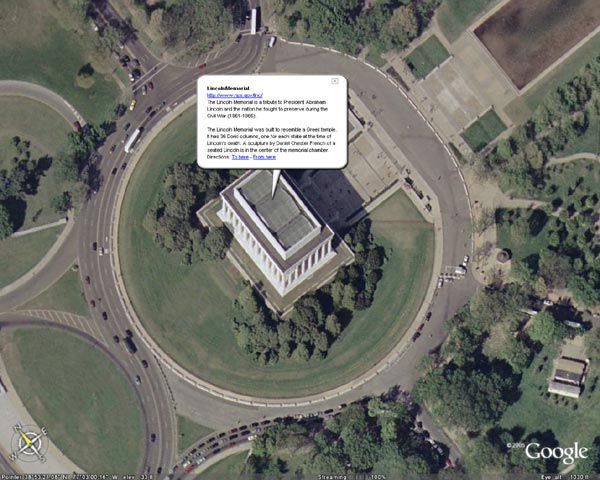
Google Earth is a free software download for PCs (WinXP) and now Macs (OS 10.4) that allow you to view actual satellite images of most locations on Earth. From Google: "You point and zoom to anyplace on the planet that you want to explore. Satellite images and local facts zoom into view. Tap into Google search to show local points of interest and facts. Zoom to a specific address to check out an apartment or hotel. View driving directions and even fly along your route."


Check it out at: http://earth.google.com/

Tuesday, December 13, 2005

CapEd - Capital U.'s Blog about Educational Blogging

Check out this "blog about blogs" by Capital University. It designed to be an online reference for blog use in education, and is a valuable resource. Add it to your list of sites you periodically review!

http://capedblog.blogspot.com/

Monday, December 12, 2005

THE QUESTION-ONLY SESSION

(written by: Stacey Mathey Osborn (Children's Literature, English)

As a wrap-up to a lecture or class discussion, try a question-only session. The original idea came from a conference of Lincoln Center Teaching Artists in New York City. These folks are the real deal in teaching; I was blown away by the intensity of the sessions and teaching tools (not to mention the self-knowledge) I carried away from each day's activities.

How to:
Everyone in the class jots down a question on a scrap piece of paper. The questions can take any form (who, what, where, etc), and should be based on the class lecture or discussion. When everyone has written a question down, call for all the questions by going around the room, but DO NOT ANSWER them. Everyone participates (even if they just say "pass). You'll be surprised at what you'll learn about not only your students but about your field of study! And your students will be really surprised at how inquisitive they actually are.

Here are some things to keep in mind.
o Give an example (or two!) of the type of question you mean. Questions should be related to the class lecture or discussion.
o Questions can be something that students are still wondering about, or can be very general questions about the topic under discussion.
o If students are struggling to come up with a question, have them write down one fact that they learned in class that day, and turn that into a question. For example, after a lecture on traditional literature, students may have learned that the "trickster character" in many African countries is named Anansi the Spider. A question that might be developed off that fact is: "How did the spider come to be used as "the trickster" in Africa, but in western culture, it's often a fox?" Or "Who was the first person to tell an Anansi story?" Or "Are there other trickster types besides Anansi in traditional African tales?"
o Students are allowed to say "pass" if they don't want to participate. This also makes it easy for students who don't "get it" the first time you do this.
o DO NOT ANSWER the questions, even if you know the answer! Just let the questions fly! Let the spirit of "lifelong learning" seize the class.
o The first time you do this, be sure to give students at least 3-4 minutes to come up with a question. You may even suggest that they come up with 3-that puts the pressure on, and they're almost sure to come up with at least one question.
o It takes about 8-10 minutes to run the whole "show," from the introduction of the idea, to the writing, to the speaking.
o Encourage students NOT TO PACK UP THEIR THINGS until everyone has spoken their question.
o If a question is really outstanding, at the end of the session, ask the student to give you a copy, or jot it down yourself and answer it at the beginning of the next class. This is a GREAT transition, and also shows the value of the question-only session as a tool for further inquiry.

VARIATIONS:
The pre-emptive strike question-only session

As the name suggests, have students ask questions about a text under discussion before you start the class lecture or discussion.

"Upcoming-assignment" question-only session:

Have a big project or paper coming up? Take the last 10-15 minutes of class and have students brainstorm with a partner, discussing approaches to the project, etc. Each person has to write down 3 questions that the other person asked them. Then, you open up the floor for questions only. That's a really fun one. You'll learn very quickly what they're apprehensive about.

"I didn't know":

This is actually an idea I got from an 8th-grade middle school English teacher. Apparently, one day her students were pestering her with so many questions (for which she had no answers) that finally she yelled out in frustration: "You know, I can't know everything!" She asked all her students to take out a piece of paper and write down 10 things that they just "don't know." She said the results were amazing! The students were all humbled by one another's admissions. I re-conceived the idea for my college-level students who really seem to know just about everything (ahem). So here's how it goes.

Students write an "I didn't know" statement about something that they learned in class that day.

Here are some things to keep in mind...
o I ALWAYS go first AND LAST with this one.I say something that I didn't know before coming to class that day, or something that I learned that was new when I was reviewing my lecture notes. THEN. I try to pay really close attention to the students, and try to learn on the spot from what they're saying, and try to conclude with a brand-new thing that I learned at just that moment. For example, it could even be "I didn't know that Anansi the Spider was so fascinating to y'all!" if many students said that they didn't know about Anansi before coming to class.
o I use the "I didn't know." session only after I've done the question-only session a few times in previous classes. They're a lot more comfortable speaking out about something they didn't know if they know the routine from the question-only session.
o The fun thing about this is I used to think that students already knew everything I was saying before I said it. WRONG! It was very gratifying to hear that even some of the simplest things were new to them.
o It's also nice for them to hear that their peers all learned something, too-that they weren't the only one in the class who "didn't know" a fact.

Thursday, December 08, 2005

Free Online Surveys

Surveys are an excellent way of collecting and analysing information quickly and efficiently. Many electronic surveys found online are even free! You'd be surprised at how useful these tools are once you start using them! After reviewing many of the available ones out there, I've separated the good from the bad for you:


PollCat Surveys Lite - http://www.pollcat.com/

-----------------------------------------------------

PollCat offers branded surveys with a variety of question format
options. A 30-Second Tutorial gets you off to a quick start with your
first PollCat survey. PollCat Lite offers a nice selection of survey
creation and editing tools, and you can choose from many types of answer choices. Deploy PollCat surveys with OneClick Publishing. Add your own Header, Footer, and Page Titles, or use standardized templates. Additional features include: unlimited survey length (questions or pages), unlimited length of data collected,
direct links from your web page to a survey with auto or defined
return, anonymous questionnaires, linkage of extra data to responses
for custom tracking and reporting, response data downloadable in MS
Access, XML, HTML, and Excel formats. PollCat Surveys are
remotely-hosted. Each PollCat poll has a unique URL that you can
e-mail to survey takers, or post as a link on your website.


Survey Monkey - http://www.surveymonkey.com
-------------------------------------------

SurveyMonkey offers an instructional starter survey that brings new
users quickly up to speed. You may customize surveys with your own
logo, personal welcome and thank yous. Offers many types of answer choices. Very simple to customize and deploy. Reporting options include custom filters, data export, as well as several standardized reports. Basic (Free) Service
allows 10 questions per survey, and up to 100 responses. No banner ads
on the surveys.


Zoomerang -- http://www.zoomerang.com
--------------------------------------

A full-featured online survey service. Features: 30 questions per survey, multiple pages allowed,reports limited to 100 responses per survey, data is stored for 10
days. It's easy to select and customize the many templates. There is no banner advertising. Allows use of your own e-mail client and
addresses to send survey notifications or you may select Zoomerang branded e-mail, and use the Address Book provided.
Surveys are taken on the Zoomerang site, and data stored there. View
Results online or via e-mail. Limited analysis capability, however
allows comparison between two survey questions at a time. Extensive
support knowledge base available.


Response-O-Matic – http://www.response-o-matic.com
--------------------------------------------------

Response-O-Matic is a form creation tool that creates individual
surveys. Response-O-Matic provides customized HTML form coding that is
added to your own web page(s). The forms are processed by
Response-O-Matic – you receive response data via email, however there
are no data analysis tools provided. Write your own questions, select
colors, form fields, and allowable responses. Just five simple steps:

-- Use the Form Wizard to create a form template.
-- Save the form template to your hard drive.
-- Modify the form to ask your visitors any questions you want.
-- Upload the completed form to your website.
-- Test the form to make sure it works properly.


Insiteful Surveys – http://www.insitefulsurveys.com
---------------------------------------------------

Insiteful Surveys offer a many advanced survey features like over a dozen free question formats and unlimited survey editing. Also included is a large Question Library, or you're free to design your own questions. There is a limit of 10 questions per survey, and 50 responses per month. Insiteful provides a unique URL for each survey. Responses are stored on Insiteful's servers and can be viewed at any time in text or graphical format.


Want proof of how useful and simple this is? I just created a survey in ten minutes! Take it here!
Tuesday, November 29, 2005

The Wiki, the Witch, and the Wardrobe

Chronicles of Narnia series - a wiki (collaborative web pages) describing various aspects of the books and beyond: Narnia Confidential

How could something like this be used in your course(s) to enhance, supplement, or even replace current methods of fostering student-generated responses to readings?

"...there is a blog for every age..."

Do Many Students Keep Blogs?

Yes! According to a November 2005 study by the Pew Internet & American Life Project, 19% of online teens keep a blog and 38% read them. This represents approximately four million students who blog and is a significantly higher percentage than the adult population (7%). Another Pew study found that 68% of all teenagers have used the Internet at school.

Yet youths aren't the only ones utilizing this method of communication. This uplifting article proves that you can indeed teach an old dog new tricks, such as how to "sit up"' and "post blog." (And any other "dogs" out there that want to learn the "post blog" trick can find links at the bottom of the article that will help you do just that!)

For more information about who is using blogs and what content they can and can't contain, consult these frequently asked questions.

Monday, November 28, 2005

Reserve your Workshop Seat Now!

There are still seats available for the following workshops to be held at The Center for Teaching, Learning and Technology for the weeks of 11/28/05 and 12/5/05.


To register, please contact Kris Sautter at ksautte@bgnet.bgsu.edu or 419-372-0325.


Thank you,
Kris


BASIC Photography
November 30 3:00-3:45
This short but focused workshop will help you become familiar with all the standard features of a typical consumer digital camera that you may currently own or are about to purchase. Topics will include: suggested auto settings, uploading images, and camera selection suggestions.


Making Connections With Concept Maps
Thursday, December 1 12:00-1:30
Concept maps allow students to show deeper understanding of a topic by generating categories, making cross links and organizing it all into a hierarchical structure. Participants will engage in a discussion of the current research regarding concept mapping and learning as well as learn how to use concept mapping software such as Cmap or Inspiration to create maps for your course. The culminating activity will be to develop an activity where students are challenged to create a map in order to demonstrate their understanding of a concept, process or event.


Using Epsilen ePortfolio in Your Courses: The Basics
Monday, December 5 2:00-3:30
Dr. Milt Hakel will present how to integrate BGSU's ePortfolio application, Epsilen, in order to develop increased student interaction, reflection and evaluation within your courses.


Advanced ePortfolio Topics: Using Epsilen in Your Program
Tuesday, December 6 2:00-3:30
Dr. Milt Hakel will present how to use BGSU's ePortfolio application, Epsilen, in relation to your program learning outcomes and assessments.

Wednesday, November 16, 2005

New Workshops Are Coming Soon to the CTLT!

The Center for Teaching, Learning and Technology is offering a few new workshops in 201 University Hall. Come join us and learn more about podcasting, using Excel for interactive images and an intro to Blogs & Wikis. Please contact Kris Sautter at ksautte@bgnet.bgsu.edu or call 372-6898 to register for the workshops.

Using Classroom Assessment Techniques (CATs) to Guide Instruction
Wednesday, November 16 1:00-2:30

Many times the only assessing we do of students is in order to assign a grade, but there are other reasons and ways to assess student learning. Classroom assessment techniques offer an instructor some practical, quick and concise ways to gather information about student learning and understanding and help to guide future instruction to foster greater engagement and understanding.

In Angelo & Cross' 1993 book, Classroom Assessment Techniques, they describe 50 different techniques for teacher-centered approaches "designed to help teachers find out what students are learning in the classroom and how well they are learning it." Participants will identify critical course teaching goals that can help them determine appropriate CATs to use with their students and how to integrate these with current instructional practice to guide instruction toward increased student learning.


Creating Interactive Images (using Microsoft Excel)
Monday, November 21 2:00-3:30

Make your diagrams, maps, images and timelines come alive by using MS Excel, transforming them into interactive collaborative pieces. Students and teachers can use Excel to create images that assist in identifying parts, dates, or events while also allowing students to practice online research and citations. Participants will create an interactive file that can be used in their course and also plan a student project that incorporates their creation of one as well. These files can be saved from year to year and made available to future students as study guides, review or samples. We will also discuss how to convert these files into other types of image files so they are also available to anyone without MS Excel.


Creating Podcasts For Your Course - How to Get Started
Wednesday, November 16 3:00-5:00

If you already know the basics of podcasting and you're ready to get started, then this workshop is for you. From utilizing already created or saved podcasts to creating your own from scratch, we will go through all the steps needed in order to meet your educational outcomes. A reference handout will also be provided to all participants.


Student Voices & Collaborations: Intro to Classroom Blogs & Wikis
Thursday, November 17 2:00-3:00
Tuesday, November 22 10:00-11:30

If you're looking for a new way to get your students thinking, talking, writing, creating and analyzing knowledge, then take a look at weblogs (blogs) and wikis. Both blogs and wikis are free online writing tools, essentially webpages where students can write about a prescribed topic or generate one of their own. Blogs are often described as a personal online diary or journal of experiences, thoughts, images, ideas and conceptualizations to which others can leave comments or add their own "posts". Wikis are similar to blogs, but more collaborative since they allow for more than one person to contribute by making changes or building new pages. Both tools are fairly new, especially to the education world, but they offer a new dimension to the learning environment and community by extending the classroom experience, social engagements, and critical voice.

This workshop will provide an opportunity to discuss current research of potential uses of blogs and wikis in your classes as well as create one of your own through readily available online sources. As part of this workshop, participants will generate more discussion by contributing classroom applications of these tools to the CTLT's weblog, "Enhancing Teaching & Learning at BGSU".

Monday, November 14, 2005

An Example Blog about Educational Blogging

Go to the site hyperlinked in the title above to find an example blog about, what else, educational blogging! There you'll find tips about how you can incorporate such a useful tool into your curriculum, as well as see how fun and easy it is to do. Is your curiosity piqued yet? If so, you can simply follow this link to find out more!

Rubrics to Evaluate Classroom Blogging

Here are some useful rubrics for evaluating student blog components of your curriculum:

A quick, one-page PDF version that has ratings of excellent, satisfactory or unsatisfactory.

This is called a Blog Reflection Rubric that addresses several outcomes with each weighted differently.

Here is an example of a holistic rubric, showing all requirements for a given score.

A blog rubric that distinguishes between proficient and developing skills at the university level.

One more example of an analytical rubric for evaluating a blog.

Ever assign a book to read? How about assessing student learning via a "Book Blog"? Here is a rubric to help you evaluate their book blogs.


A colorful holistic rubric (with a typo or two). It's a good example of how to create an easy to read holistic rubric for blogs or other general rubrics.

A simple rubric for scoring student blog posts. Using posts about an assignment on homelessness as an example, this rubric uses 5 categories and a 3 point scale (2=Excellent, 1= Satisfactory, and 0=Unsatisfactory). Scores are multiplied by either two or three to weight them differently for the final tabulation.

This one has some 5 categories scored on a 1-5 scale. Simple, logical and fast.

This one is a 4 point scale for many categories all dealing with blog entries made in response to reading and evaluating a literature article. Some of these might be modified or deleted to make this applicable to other disciplines as well.

This blog rubric addresses the Seven “C’s” of evaluation, on a 10-0 scale to make tabulation and assigning grade %’s easy.

This blog rubric is suited for giving a ‘blog grade’ at the end of a course for a student’s total blog contributions over the course of the term. Especially useful for blogs where students are presented problems and expected to work in groups to solve them by communicating online.

This useful rubric's scale is weighted so that the student’s score tallied out of 100%. This is excellent for blogs where a student has to create their own writing samples in response to questions or prompts.

A handy yet smaller rubric with only 3 categories and a scale of 1-4. Appropriate for journal entries or regular comments about an assigned topic.

A comprehensive blogging rubric with a 4 point scale and 5 categories. Note: Two columns (Beginning Blogger and Developing Blogger) should be switched so that Beginning Blogger and its associated items are worth only one point while Developing Blogger is worth two.

Finally, here is a rubric that can be used for student evaluations for students to post after an assignment or after the end of a course.

Thursday, November 03, 2005

Assessing Student Learning Using Rubrics

Here are some resources on rubrics that were shared during our Threaded Workshop Series on assessment:

Designing Scoring Rubrics for Your Classroom (Craig Mertler, BGSU)

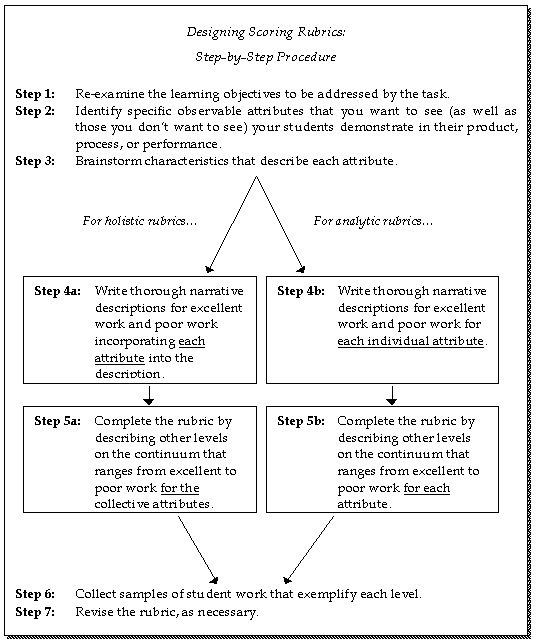
Rubrics are rating scales-as opposed to checklists-that are used with performance assessments. They are formally defined as scoring guides, consisting of specific pre-established performance criteria, used in evaluating student work on performance assessments. Rubrics are typically the specific form of scoring instrument used when evaluating student performances or products resulting from a performance task.

There are two types of rubrics: holistic and analytic. A holistic rubric requires the teacher to score the overall process or product as a whole, without judging the component parts separately (Nitko, 2001). In contrast, with an analytic rubric, the teacher scores separate, individual parts of the product or performance first, then sums the individual scores to obtain a total score (Moskal, 2000; Nitko, 2001).


Authentic Assessment Toolbox (Jon Mueller)

Weighting certain skills or categories within the rubric should also be considered.

Create & Save Your Own Rubrics

RubiStar is a FREE online tool to help the teacher who wants to use rubrics but does not have the time to develop them from scratch. There are about 50 categorized templates to start with when creating a rubric for your own assignment. You select appropriate criteria from pull down menus and descriptions are instantly added into the four rated columns. Each criteria, rating/score and description is editable either online in Rubistar or after downloading it into an Excel file.

These rubrics can be printed, saved as web browser files or downloaded as Excel spreadsheets to be manipulated further, as needed. For example, if you'd like to add a column for "Student Self Evaluation", you could do that in the Excel version by simply adding a new column and typing in a new heading as needed.